Sferyx JSyndrome HTML Editor Component Edition
The most powerful editing solution - Advanced Java HTML Editor Component for Java Swing, SWT, Oracle Forms and JavaFX with Automatic Image Upload, Copy & Paste from Microsoft Office, Open Microsoft Word Docx and Rich Text Format, Save as HTML, Docx, PDF
Sferyx JSyndrome HTML Editor is a full featured Visual
Java WYSIWYG HTML Editor and Rich Text Editor Swing Component with unprecedented editing power. It is suitable for use in any kind of Java applications which need advanced HTML document authoring or document creation. The rich text editor includes all the necessary features to create even very complicated HTML, Microsoft Word Docx or Rich Text Format documents visually, such as designing and resizing tables, inserting and resizing images visually, page backgrounds, editing text and paragraphs, and also Spellchecker, Search/Replace, Source Editor, Preview, Automatic Image Upload, Copy & Paste, Drag & Drop from Microsoft Office, Equation Editor, PDF Export and much more.
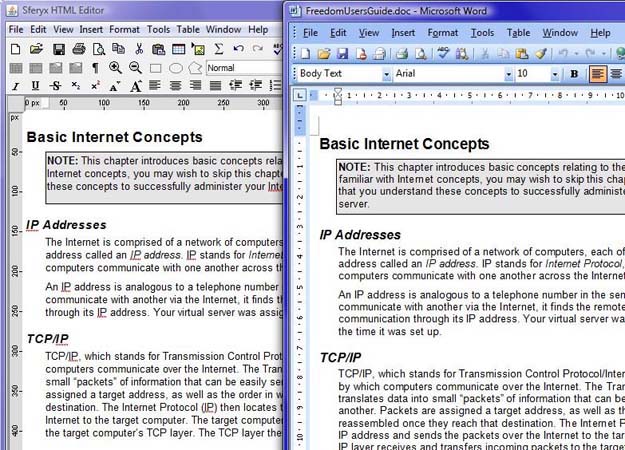
Open, Import and Save Docx files, Copy & Paste, Drag & Drop from Microsoft Office
Import any content from Microsoft Office or applications like OpenOffice, LibreOffice etc. You can also paste Rich Text Format from any application including PDF files
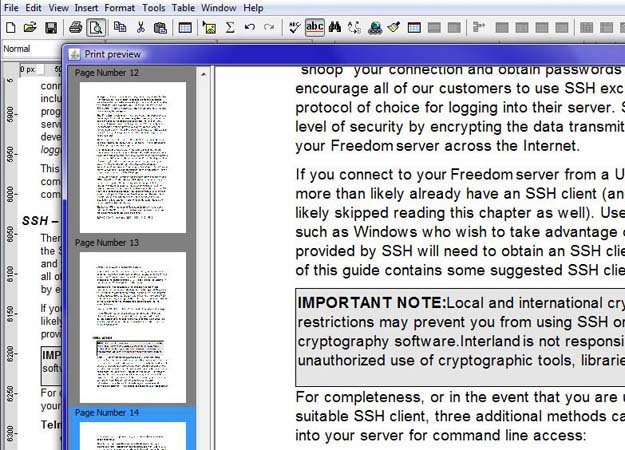
Print Preview functionality
Print Preview functionality allows to preview the document paging before printing and set headers, footers and page numbers.
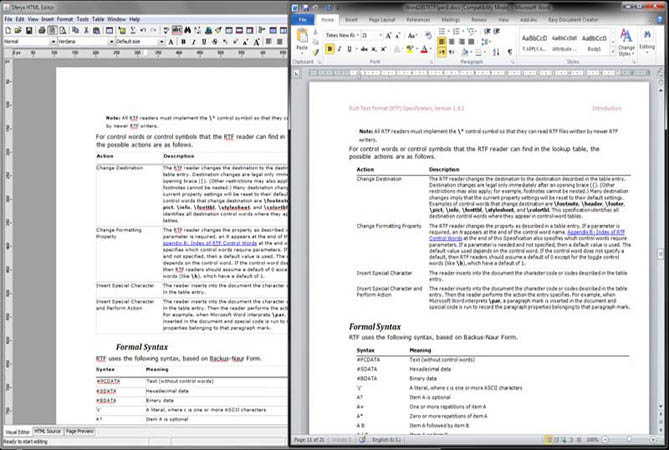
Page Layout view
The Page Layout View emulates the MS Word Print View Layout - shows the print layout of the page while editing the document
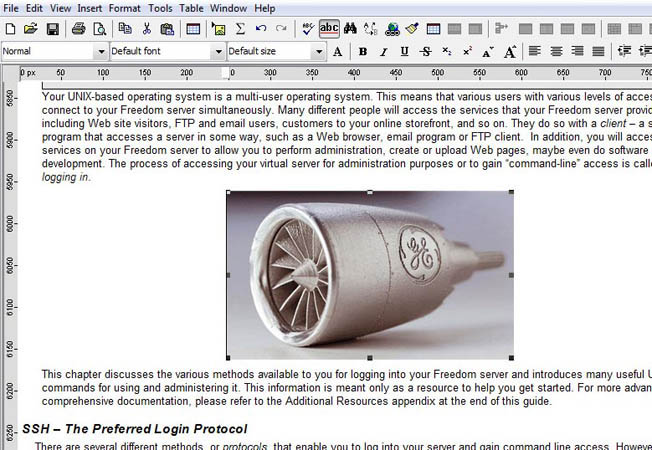
Upload Automatically all Images as Multipart Form Data or WebDAV
Upload automatically all images to a given location or save them using WebDAV - the editor will also translate automatically all image URLs inside the document.
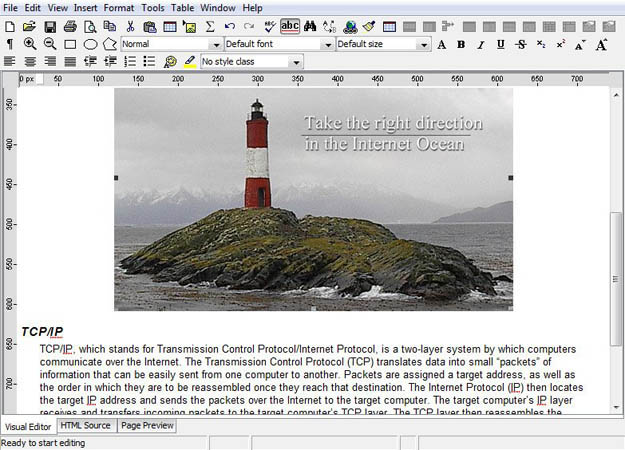
Visual Image Resizing
Resize images visually by selecting them and dragging the edges. You can Drag & Drop images from files or external applications or paste in-memory images copied from Photoshop or other applications.
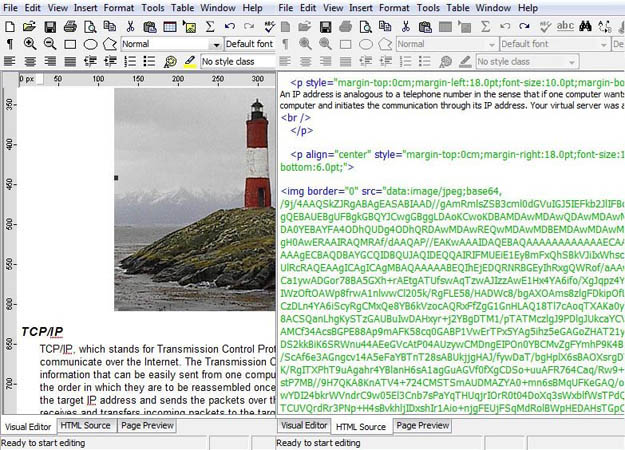
Embed all Images as Base64 encoded Strings
You can embed automatically all images inside the document creating a self contained document visible in any modern web browser - this allows very easy transfer of the entire documents as Strings and saving them into a Database or single html file
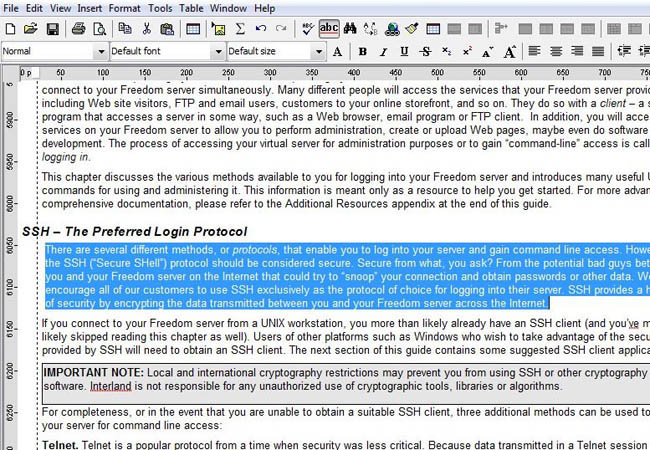
Set Margins Visually with Rulers
Align and move easily paragraphs with the horizontal ruler as you would do in Microsoft Word or similar applications
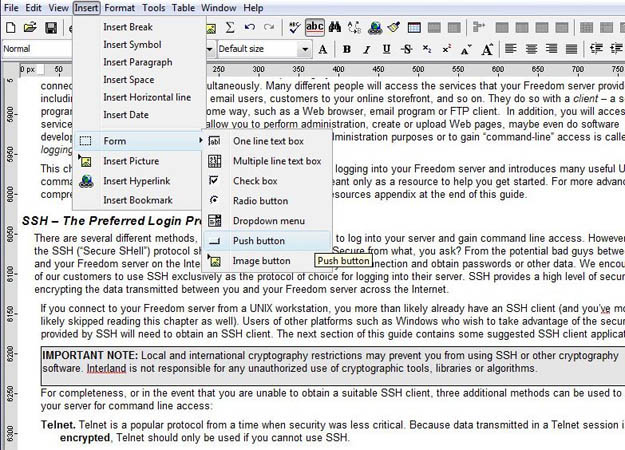
Design and Edit HTML Forms
You can insert form elements or edit visually existing HTML forms.
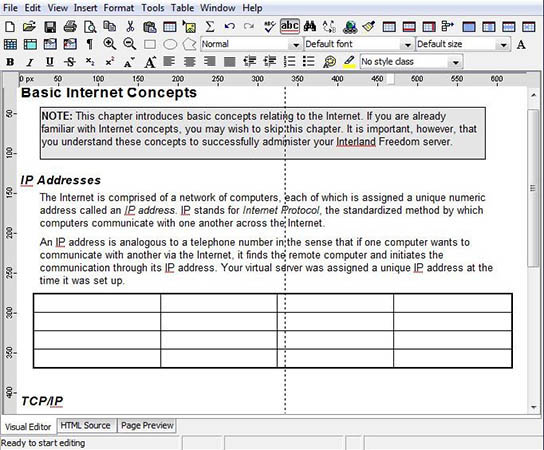
Edit Tables Visually
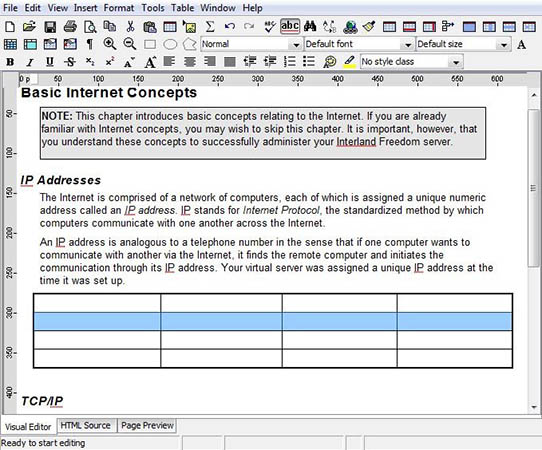
You can easily resize tables visually by dragging the table cells vertically or horizontally. You can also select and drag and drop entire tables.
Royalty Free distribution licenses & Source Code licenses
You can pack the component with your applications and services - there are no other fees - all licenses are a one time fee.
Trusted Code Signing Security Certificate


Download Sferyx JSyndrome HTMLEditor Component Edition Pro : HTMLEditorDemo.zip
(ZIP file, ~ 2.6 MB)
- 100% Java HTML Editor and Java Rich Text Editor component - integrates easily with any Java application - Java Swing, Eclipse SWT, JavaFX, Oracle Forms
- Full Copy & Paste and Drag & Drop from MS Word and MS Office, OpenOffice and many other applications with automatic publishing or uploading of all images and filtering of the proprietary tags - generates clean HTML code.
- Print Preview functionality and also Page Layout View in edit mode like MS Word provide common Rich Text Editor functionalities in your Java applications.
- Export and save as Microsoft Word Docx, PDF, Multipart MIME message format as Outlook EML file
- Send e-mails directly from the editor and save the entire content with all images as .eml MIME Message format file which can be opened in Outlook, Thunderbird etc.
- Open, Import or Drag & Drop Microsoft Word Docx files and Rich Text Format .rtf files - Docx files can be imported natively without the need of Microsoft Word to be installed
- Embed all images as base64 encoded strings inside the document and create standards compliant self contained document viewable with any web browser - very useful to save the entire document including the images as a string for example in a CLOB database field
- Read-only sections can be easily defined inside the document for creation of templates
- Fully customizable - huge API available for customization and advanced features
- Automatic image and file upload with support for PHP, ASP/.Net, JSP/Servlets, ColdFusion, Perl etc as Multipart Form Data
- Automatic image and file WebDAV upload support
- Configurable code generation - Legacy mode and Standards compliant mode without deprecated tags. Passes successfully various standards tests, including ACID ones for e-mail content
- Full integration with Oracle Forms, Eclipse / SWT, Java Swing, JavaFX
- Available bundles with built-in MathML /Sferyx Equation Editor and Sferyx PDF Export,
- Support for defining Custom XML Tags - custom rendering and custom actions
- Royalty Free distribution licenses
Sferyx JSyndrome HTML Editor Component Integration Manuals
Major benefits of using the Java WYSIWYG HTML Editor Component
The component is ready to be used inside any Java application like Swing, Eclipse SWT, JavaFX or Oracle Forms or as an applet for example in a Content Management System, CRM solution, Site management etc. The Java WYSIWYG HTML Editor and Java Rich Text Editor component is very easy to integrate into already existing applications because it has a huge API which permits its full customization on the basis of the customer's requirements. Automatic uploading features permit instant publishing of any kind of content - from images, rich text content to all hyperlink targets - PDF files, Word documents and all local files linked to the currently edited document. The remote and local file browsing features allow to the user with zero effort to insert any content from everywhere into the edited document.
- Full range of functionalities comparable to all popular web authoring packages, with familiar text processing interface
- Fully customizable - the editor can be fully customized in order to fit your requirements.
- Configurable Image/File Upload functionalities allow direct publishing of images/files to the server in a transparent for the users way through ASP/.Net, PHP, JSP, ColdFusion, Perl and more
- Java based product - it is cross platform, tested under Windows, Linux, Mac OS X, Solaris
- To satisfy the needs of wide range of users it is diversified in three versions Light, Professional, Enterprise and in tree editions: Component, Applet, Application
- Optimal ratio price / quality
- Very flexible and competitive licensing policy - the best possible pricing options on the market, convenient OEM and SourceCode licenses as assurance for corporate customers
- The retail products are assured with 30 days start up e-mail support included in the price
- Corporate customers are assured with Source Code License
- Continuous e-mail support and updates through maintenance annual subscriptions.
- Wide range of practically all customization services one client could need in order to fit our products into the customer's requirements.
- Full internationalization support - the GUI can be translated in any language through the available internationalization and customization features
- The Component Edition comes with trusted code-signing certificate from Thawte - allows full Copy & Paste operations from external applications such as MS Office etc, directly into the on-line editor.
Basic Features Matrix
The rich text editor component's Professional and Enterprise versions add even more power giving
to the developers the possibility to use the editor as development
platform for editing directly HTML source code, apply style sheets,
create read-only sections within the document and much more.
Runs on Windows 98, ME, 2000, XP, Vista, 7, 8, 10,
Linux, Mac OS X, Solaris and its powerful configuration features and
Java API allow perfect integration with any kind of Java
Applications and server
side scripts for saving and retrieving of documents, inserting
images, hyperlinks etc.
Features |
Light | Professional | Enterprise |
| Open, save HTML/XHTML files, Export and save as HTML, DOCX, PDF, EML | ✓ | ✓ | ✓ |
| Open, paste, import Rich Text Files (RTF) / Open, paste and import DOCX files / Export FO XML | ✓ | ✓ | ✓ |
| Remote file browser dialog - permits easily browsing of files on the server side with minimum adapting of your server scripts - saves a lot of work for javascripts etc. Different remote browse locations for images and links | ✓ | ✓ | ✓ |
| Two mode operation of the file browsing - local & remote - can be set easily via methods and parameters.. | ✓ | ✓ | ✓ |
| Full Copy & Paste and Drag & Drop of formatted content directly into the edited document from external applications such as Microsoft Word, Excel, Outlook, Front Page etc. | ✓ | ✓ | ✓ |
| Signed with trusted security certificate component and applet provide full copy & paste operations from external applications such as Microsoft Word, Excel, Outlook, Front Page etc. | ✓ | ✓ | ✓ |
| Loads & renders XHTML files, outputs XHTML files. Send e-mails directly from the editor and save the entire content as .eml file which can be opened in Outlook, Thunderbird. | ✓ | ✓ | ✓ |
| Support for loading external CSS through the LINK tag | ✓ | ✓ | ✓ |
| Automatic detection of the page encoding and full rendering/editing both in WYSIWYG and HTML source modes of international char sets such as Greek, Cyrillic, Arabic, Chinese etc. Full list here | ✓ | ✓ | ✓ |
| Support for setting of default char set if the page or the fragments of pages does not contain the char set information - setDefaultCharset(String char set). | ✓ | ✓ | ✓ |
| Insert symbol dialog - support for inserting of all possible symbols & special characters.. | ✓ | ✓ | ✓ |
| Font size, family and foreground color | ✓ | ✓ | ✓ |
| Font style (plain, italic, bold) | ✓ | ✓ | ✓ |
| Extended Font chooser for adding underline, strikethrough, superscript, subscript font attributes. | ✓ | ✓ | ✓ |
| Support for setting the page character encoding through the page properties dialog. | ✓ | ✓ | ✓ |
| Image selection - the selected images are highlighted. Easy one click copy & paste, drag for resize | ✓ | ✓ | ✓ |
| Table selection - through the CTRL + click - selecting/deselecting of table cells. | ✓ | ✓ | ✓ |
| Insert hyperlink interface for inserting hyperlinks over the selected text through javascript. | ✓ | ✓ | ✓ |
| Page properties: background color, background picture, title, text color, hyperlink color etc.. | ✓ | ✓ | ✓ |
| Tables design and properties: background color, background picture, size, alignment, border etc. | ✓ | ✓ | ✓ |
| Tables cell design and properties: background color, background picture, size, alignment etc. | ✓ | ✓ | ✓ |
| Invisible tables (with border 0) are shown as dashed lines. | ✓ | ✓ | ✓ |
| Insert table rows, insert table columns, split and merge table cells. | ✓ | ✓ | ✓ |
| Insert images - from a remote location or using a file dialog. | ✓ | ✓ | ✓ |
| Image properties: size, border, hyperlink, alternative text, alignment, spacing etc. | ✓ | ✓ | ✓ |
| Create and modify HTML Forms: insert new forms and form elements, buttons, checkboxes, radio buttons, text fields, select fields (dropdown menus and lists), text area, image buttons etc. | ✓ | ✓ | ✓ |
| Form boundaries are shown as a dashed line. | ✓ | ✓ | ✓ |
| Creation of hyperlinks in the text or images. | ✓ | ✓ | ✓ |
| Bulleted lists. | ✓ | ✓ | ✓ |
| Numbered lists. | ✓ | ✓ | ✓ |
| Increase / decrease indent of paragraphs like Microsoft Word by dragging the ruler | ✓ | ✓ | ✓ |
| Paragraph alignment: left, right, centered. | ✓ | ✓ | ✓ |
| Full undo/redo support. | ✓ | ✓ | ✓ |
| Printing support, Print Preview support | ✓ | ✓ | ✓ |
| Adaptable popup menu on the basis of the underlying element. | ✓ | ✓ | ✓ |
| Built-in toolbars, main menu, status bar etc. which can be enabled or disabled. | ✓ | ✓ | ✓ |
| Search and replace functionalities, preserving the document formatting. | ✓ | ✓ | ✓ |
| Automatic upload of all local images and hyperlink targets to the server as multipart form data | ✓ | ✓ | ✓ |
| All document images can be embedded inside the document as a base64 encoded strings and create standards compliant self contained document | ✓ | ✓ | ✓ |
| Full Internationalization support | ✓ | ✓ | ✓ |
| Possibility to adjust the font rendering size | ✓ | ✓ | ✓ |
| MS Word paste / improved rendering filter | ✓ | ✓ | ✓ |
| Aligned images text wrapping | ✓ | ✓ | ✓ |
| Ability to add javascript buttons to the editor toolbars to invoke javascript functions from the document (applet edition only) | ✓ | ✓ | ✓ |
| Heading selection for titles | ✓ | ✓ | ✓ |
| Copy formatting tool | ✓ | ✓ | ✓ |
| Full backward compatibility with java 1.3 | ✓ | ✓ | ✓ |
| Mixed mode Local & Remote Browsing and improved remote browsing | ✓ | ✓ | ✓ |
| Full style sheet editing support - style classes can be applied through the property dialogs to each element - font, tables, images, all form elements | ✓ | ✓ | ✓ |
| Ability to specify external style sheet to be loaded through applet parameters (applet edition only) | ✓ | ✓ | ✓ |
| Possibility to mark sections/elements of the document as readonly and not editable | ✓ | ✓ | ✓ |
| Built-in HTML source editor with syntax highlighting. | ✓ | ✓ | |
| Built-in preview section for previewing of the edited documents. | ✓ | ✓ | |
| Spellchecker component | ✓ | ||
| Replaceable dictionary functionality for the spellchecker | ✓ | ||
| Custom dictionary functionality (add new words to dictionary) for each user | ✓ | ||
| XML support - possibility to create custom grammar and provide own rendering rules for custom tags through style sheets | ✓ | ||
| XML support - possibility to create custom dialogs and associate actions with custom tags | ✓ | ||
| Javascript emulation engine - you can refer and manipulate document elements through emulated javascript calls | ✓ | ||
| Built-in full featured Visual MathML Equation Editor component (Sferyx Equation Editor) | Optional | Optional | Optional |
| Built-in full featured Visual FTP component (Sferyx FTP component) | Optional | ||
| Built-in full featured Visual CSS Editor component (Sferyx CSS Editor) | Optional | ||
| Built-in PDF
Export component (Sferyx
PDF Export Add-on) |
Optional |
Optional |
Optional |
Customers
Sferyx customer base counts more than 1000 corporate customers and institutions from over 40 countries and different industrial sectors as follows: Media and publishing companies, Internet Service Providers, Research Labs, Fortune 500 companies, Universities, Colleges and Schools, Software Developers, Content Management Systems developers, Web design agencies.
More than 1000 corporate customers, among them:
 |
 |
 |
 |
 |
 |
 |
 |
 |
 |
 |
 |
 |
 |
 |
 |
 |
 |
 |
 |
 |
 |
 |
 |