Sferyx JSyndrome HTML Editor Component Edition
Oracle Forms HTML Editor Integration Manual
Advanced WYSIWYG Oracle Forms HTML Editor component with Automatic Image
Upload and Store to Database, clean Copy & Paste from Microsoft Office,
PDF Export.
Open and import Rich Text and Microsoft Word Docx files,
Save as Microsoft Word Docx
Version 22.0
Sferyx JSyndrome HTML Editor is a full featured WYSIWYG HTML Editor for Oracle Forms and Oracle Fusion Middleware. It is suitable for use in any kind of Oracle Forms applications which need advanced HTML document authoring or document creation. The editor includes all the necessary features to create even very complicated HTML, Microsoft Word DOCX or Rich Text Format documents visually, such as designing and resizing tables, inserting and resizing images visually, page backgrounds, editing text and paragraphs, and also Spellchecker, Search/Replace, Source Editor, Preview, Automatic Image Upload, Copy & Paste, Drag & Drop from Microsoft Office, Equation Editor, PDF Export and is also fully customizable, can be integrated into virtually any application and is royalty free for distribution.
Trusted Code Signing Security Certificate from Thawte


Download Sferyx JSyndrome HTMLEditor Component Edition Pro :
HTMLEditorDemo.zip
(ZIP file, ~ 2.6 MB)
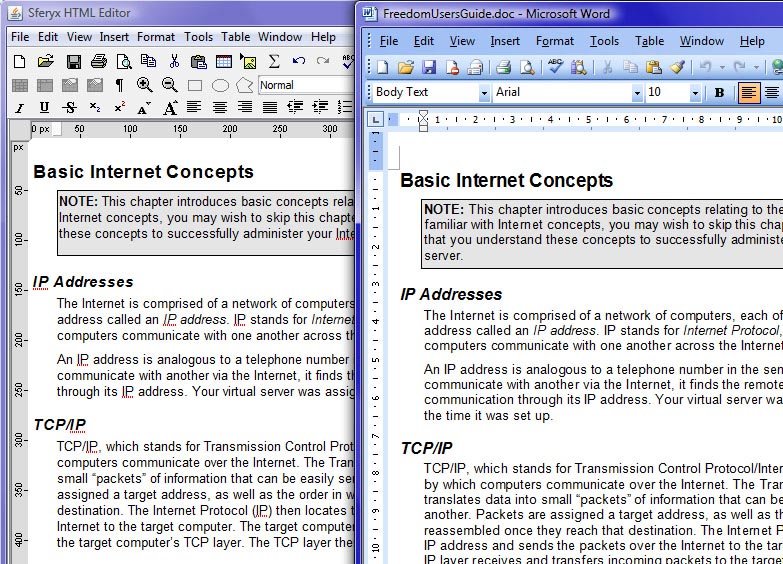
- Integrates easily with Oracle Forms, output can be easily used in Oracle BI Publisher
- Full Copy & Paste and Drag & Drop from MS Word and MS Office, OpenOffice and many other applications with automatic publishing or uploading of all images and filtering of the proprietary tags - generates clean HTML code.
- Export and save as HTML, DOCX, PDF, multipart Mime message format as Outlook EML file
- Send e-mails directly from the editor from your Oracle Form and save the entire content as .eml file which can be opened in Outlook, Thunderbird.
- Open, import or Drag&Drop Microsoft Word Docx files directly in your Oracle Form - Docx files can be imported natively without the need of Microsoft Word to be installed
- Print Preview functionality and also Page Layout View in edit mode like MS Word
- All images can be embedded as base64 encoded strings inside the document and create standards compliant self contained document - very useful to save the entire document including the images as a string for example in a CLOB database field.
- The content with all images can be saved as MIME formatted E-mail message and sent to Outlook
- Read-only sections can be easily defined inside the document for creation of templates
- Open/Save HTML/XHTML files, paste, open or import MS Word Docx files and Rich Text Format (RTF) files
- Automatic image and file upload as Multipart Form Data with support for JSP/Servlets on the server side.
- Automatic image and file WebDAV upload support
- Available bundles with built-in Sferyx Equation Editor and Sferyx PDF Export
- Royalty Free distribution licenses
Sferyx JSyndrome HTML Editor Oracle Forms Integration Manual
- How can I integrate the HTML Editor in Oracle Forms?
- How to get the content of the HTML Editor in Oracle Forms?
- How to set the content of the HTML Editor in Oracle Forms?
- How to set / get the content of the HTML Editor in Oracle Forms from a CLOB field including all images embedded as base64 encoded strings?
- How to transfer from/to the editor non western languages content such as Arabic and Cyrillic easily without encoding issues
- How to send e-mail from the editor including all images and formatting
- How to enable copy/paste from/to the HTML Editor in Oracle Forms?
- How to remove toolbar/menu items in Oracle Forms?
- Available methods accessible directly from the sferyx.administration.editors. HTMLEditorOracleBean
- How to enable capturing the events from the HTML Editor to the form?
- General tips for integration with Oracle Forms
- Various customization features for Oracle Forms integration for loading translation files, dictionaries, single line spacing etc.
1. How can I integrate the HTML Editor in Oracle Forms?
The integration is the same as for any other java bean integrated into the Oracle Forms designer. Place the jar file in the designer's classpath and it will be automatically detected by the Oracle Forms Designer. You can add it after that easily as a bean area.
Note that the delimiter between the jars in the classpath in the formsweb.cfg file is "," and not ";" - if you put the ";" it will not work properly.
- copy the HTMLEditorPro.jar file in the <ORACLE_HOME>/forms/java directory. Please note that if you are running Oracle Forms 12c you will need to restart WLS_FORMS after copying the HTMLEditorPro.jar in the <ORACLE_HOME>/forms/java folder or it will not be found.
- edit your formsweb.cfg file to add everywhere the HTMLEditorPro.jar as follows:
- for older versions of Oracle Forms like 6i, 9i and 10g it is located in the folder <ORACLE_HOME>/forms/server/formsweb.cfg
- for Oracle Forms 11g it is usually located into the folder <ORACLE_HOME>/Middleware/user_projects/domains/yourdomain/config/fmwconfig/servers/AdminServer/applications/formsapp_11.1.2/config/formsweb.cfg
- for Oracle Forms 12c it is usually located into the folder <ORACLE_HOME>/Middleware/Oracle_Home/user_projects/domains/base_domain/config/fmwconfig/servers/WLS_FORMS/applications/formsapp_12.2.1/config/formsweb.cfg )
# Forms applet archive setting for JInitiator
archive_jini=f90all_jinit.jar,HTMLEditorPro.jar
# Forms applet archive setting for Microsoft Internet Explorer native JVM
archive_ie=f90all.cab,HTMLEditorPro.jar
# Forms applet archive setting for other clients (Sun Java Plugin, Appletviewer, Oracle Forms Standalone Launcher (FSAL) etc)
archive=f90all.jar, HTMLEditorPro.jar- For Java Web Start (JWS) configuration you will need to add the jar file to the .jnlp file's <resources> section as follows:
<jar href="HTMLEditorPro.jar" download="eager" main="false"/>
or depending on your configuration will include the path to the jar file like this:
<jar href="/OA_JAVA/oracle/apps/fnd/jar/HTMLEditorPro.jar" download="eager" main="false"/>
You have to insert the correct path depending on the codebase attribute of the .jnlp file.- open the HTMLEditorSampleForm.fmb module (Oracle Forms module)
- if you don't see the editor into the Oracle Forms Builder you may need to add the <ORACLE_HOME>/forms/java/HTMLEditorPro.jar to the system variable CLASSPATH and to FORMS_BUILDER_CLASSPATH variable
- compile all and run the module
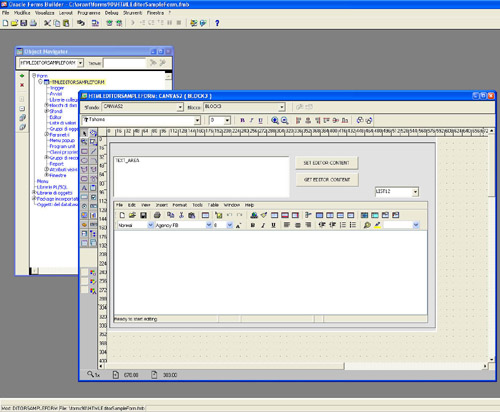
- Into the Oracle Forms Visual designer insert a Bean area and set the implementation property to sferyx.administration.editors. HTMLEditorOracleBean
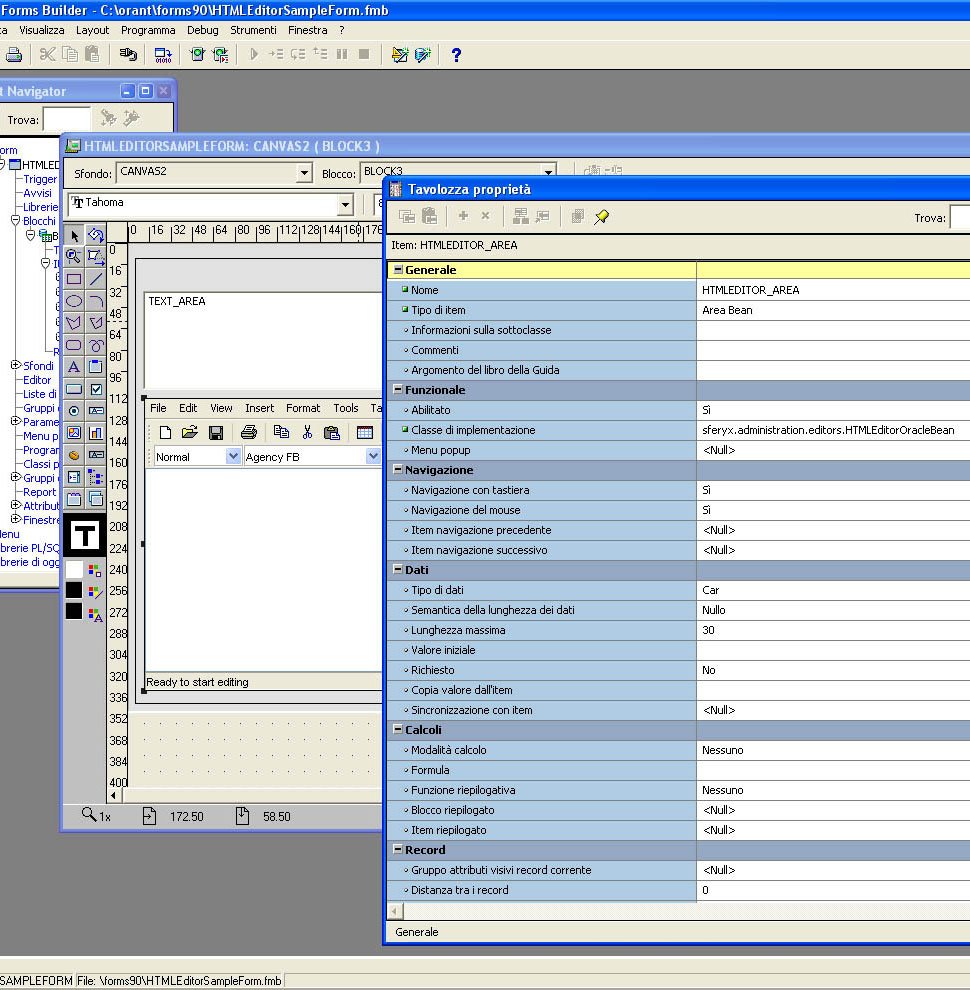
You can note on the screenshots below the bean implementation property of the Bean Area is set to sferyx.administration.editors.HTMLEditorOracleBean
2. How to get the content of the HTML Editor in Oracle Forms?
Invoking a function from PL/SQL:
Declare
vString VarChar2(2000);
Begin
vString := FBean.Invoke_Char( 'HTMLEDITOR_AREA',1,'getBodyContent');
:block3.TEXT_AREA := vString;
End;
If you want to retrieve the editor content including all document images embedded inside the document encoded as strings you should use the following method:
public void setEmbedAllImagesInsideTheDocument(boolean embed)
public boolean isEmbedAllImagesInsideTheDocument()
like this:
hArgs:=FBEAN.CREATE_ARGLIST;
FBEAN.ADD_ARG(hArgs,true);
FBean.Invoke('HTMLEDITOR_AREA',1, setEmbedAllImagesInsideTheDocument',hArgs);
After that by simply retrieving the document content using getContent() or getBodyContent() you will get also all images embedded inside the document as strings and you can save them easily into a CLOB field. See below how to save/retrieve the HTMLEditor content from a CLOB field.
FUNCTION Get_HTMLEditor_Content RETURN varchar2 IS
l_text varchar2(4000);
l_buffer varchar2(32000);
l_index pls_integer;
l_len pls_integer;
l_length number;
l_done boolean;
hArgs FBEAN.ARGLIST;
BEGIN
l_buffer := null;
l_len := FBean.Invoke_Num( 'HTMLEDITOR_AREA',1, 'getBodyContentLength');
if l_len > 0 then
l_done := FALSE;
hArgs:=FBEAN.CREATE_ARGLIST;
l_index := 1;
else
l_done := TRUE;
end if;
while not l_done loop
FBEAN.ADD_ARG(hArgs,l_index);
FBEAN.ADD_ARG(hArgs,4000);
l_text := FBean.Invoke_char( 'HTMLEDITOR_AREA',1, 'getBodyContentPortion',hArgs);
l_buffer := l_buffer || l_text;
l_index := l_index + 4000;
if l_index > l_len then
l_done := TRUE;
end if;
FBEAN.CLEAR_ARGLIST(hArgs);
end loop;
return(l_buffer);
END;
3. How to set the content of the HTML Editor in Oracle Forms?
Declare
hArgs FBEAN.ARGLIST;
Begin
hArgs:=FBEAN.CREATE_ARGLIST;
FBEAN.ADD_ARG(hArgs,'some, text');
FBean.Invoke('HTML_EDITOR',1,'setContent',hArgs);If the content is larger than 4K you will need to use the content buffer methods of the editor because of limitation in the Oracle Forms transfer length. Here is an example on how to use this:
Declare
hArgs FBEAN.ARGLIST;
Begin
hArgs:=FBEAN.CREATE_ARGLIST;FBEAN.INVOKE('HTML_EDITOR', 1, ''openContentBuffer');
FBEAN.ADD_ARG(hArgs, 'some text here');
FBEAN.INVOKE('HTML_EDITOR', 1, 'appendContentToContentBuffer', hArgs);
FBEAN.CLEAR_ARGLIST(hArgs);
FBEAN.ADD_ARG(hArgs, 'some other text here');
FBEAN.INVOKE('HTML_EDITOR', 1, 'appendContentToContentBuffer', hArgs);
FBEAN.CLEAR_ARGLIST(hArgs);
FBEAN.ADD_ARG(hArgs, 'some other text here');
FBEAN.INVOKE('bHTML_EDITOR', 1, 'appendContentToContentBuffer', hArgs);
FBEAN.CLEAR_ARGLIST(hArgs);
FBEAN.ADD_ARG(hArgs, 'some other text here');
FBEAN.INVOKE('HTML_EDITOR', 1, 'appendContentToContentBuffer', hArgs);
FBEAN.CLEAR_ARGLIST(hArgs);
FBEAN.ADD_ARG(hArgs, 'some other text here');
FBEAN.INVOKE('HTML_EDITOR', 1, 'appendContentToContentBuffer', hArgs);
FBEAN.CLEAR_ARGLIST(hArgs);FBEAN.INVOKE('HTML_EDITOR',
FBEAN.CLEAR_ARGLIST(hArgs);
4. How to set / get the content of the HTML Editor in Oracle Forms from a CLOB field including all images as base64 encoded strings
NOTE::If you want to retrieve the editor content including all document images embedded inside the document encoded as strings you should use the following method:
public void setEmbedAllImagesInsideTheDocument(boolean embed)
public boolean isEmbedAllImagesInsideTheDocument()like this:
hArgs:=FBEAN.CREATE_ARGLIST;
FBEAN.ADD_ARG(hArgs,true);
FBean.Invoke('HTMLEDITOR_AREA',1, 'setEmbedAllImagesInsideTheDocument',hArgs);After that by simply retrieving the document content using getContent() or getBodyContent() you will get also all images embedded inside the document as strings and you can save them easily into a CLOB field. See below how to save/retrieve the HTMLEditor content from a CLOB field.
In the downloadable demo in the folder "examples/oracle forms" there is an example which contains the whole code and illustrates how this works.
INSERT INTO EDITOR FROM CLOB
For this example the database contains the table EPM_CONTRACT_CONS
and the structure of this table is as follows:
EPM_CONTRACT_CONS
==============================
EMP_NO NUMBER
ASSUMPTION_DESC CLOB
insert some text into ASSUMPTION_DESC, and set EMP_NO to 1. Here below is the code for inserting the CLOB field content inside the HTMLEditor.
DECLARE
bean varchar2(200):='HTMLEDITOR_AREA';
t_id number(20):=1;
hArgs FBEAN.ARGLIST;
parts number(20);
part varchar2(32500);
part_size number(20) := 1000;
body_length number(20);
BEGIN
hArgs := FBEAN.CREATE_ARGLIST;
-- Init the editor buffer
FBean.Invoke(bean,1,'openContentBuffer');
-- Get CLOB content length
select nvl(dbms_lob.getlength(ASSUMPTION_DESC),0) into body_length from EPM_CONTRACT_CONS where EMP_NO = t_id;
if body_length > 0 then
-- Get length and number of the parts
select trunc(dbms_lob.getlength(ASSUMPTION_DESC)/ part_size) +1 into parts from EPM_CONTRACT_CONS where EMP_NO = t_id;
for i in 1..parts loop
select dbms_lob.substr(ASSUMPTION_DESC,part_size,((i-1)*part_size)+1) into part from EPM_CONTRACT_CONS where EMP_NO = t_id;
hArgs := FBEAN.CREATE_ARGLIST;
FBEAN.ADD_ARG(hArgs,part);-- Append each part to the content buffer
FBean.Invoke(bean,1,'appendContentToContentBuffer',hArgs);
end loop;
end if;
-- Populate Editor
FBean.Invoke(bean,1,'closeBufferAndInsert');
END;
SAVE INTO CLOB FROM EDITOR
This code is used to illustrate how to transfer the editor content to a CLOB field in the database.
For this example the database contains the table EPM_CONTRACT_CONS
and the structure of this table is as follows:
EPM_CONTRACT_CONS
==============================
EMP_NO NUMBER
ASSUMPTION_DESC CLOB
insert some text into ASSUMPTION_DESC, and set EMP_NO to 1. Here below is the code for inserting the CLOB field content inside the HTMLEditor.
DECLARE
bean varchar2(200):='HTMLEDITOR_AREA';
t_id number(20):=1;
hArgs FBEAN.ARGLIST;
parts number(20);
part varchar2(32500);
body_length number(20);
r_hd clob := null;
res_hd clob;
part_size binary_integer := 4000;
pos number(20);
old_length number(20);
last_part_size binary_integer;
BEGIN
hArgs := FBEAN.CREATE_ARGLIST;
body_length := FBean.Invoke_num(bean,1,'getBodyContentLenght');
parts := trunc(body_length / part_size);
DBMS_LOB.CREATETEMPORARY(r_hd,TRUE);
-- Complete parts
if parts > 0 then
for i in 1..parts loop
hArgs := FBEAN.CREATE_ARGLIST;
pos := ((i-1)*part_size);
fbean.add_arg(hargs,pos);
fbean.add_arg(hargs,part_size);
part := fbean.invoke_char(bean,1,'getBodyContentPortion',hargs);
dbms_lob.write(r_hd,part_size,pos+1,part);
end loop;
-- Last part
hArgs := FBEAN.CREATE_ARGLIST;
pos := pos + part_size;
last_part_size := body_length - (parts) * part_size;
fbean.add_arg(hargs,pos);
fbean.add_arg(hargs,last_part_size);
part := fbean.invoke_char(bean,1,'getBodyContentPortion',hargs);
dbms_lob.write(r_hd,last_part_size,pos+1,part);
else
hArgs := FBEAN.CREATE_ARGLIST;
fbean.add_arg(hargs,0);
fbean.add_arg(hargs,body_length);
part := fbean.invoke_char(bean,1,'getBodyContentPortion',hargs);
dbms_lob.write(r_hd,length(part),1,part);
end if;
update EPM_CONTRACT_CONS set ASSUMPTION_DESC = r_hd where EMP_NO = t_id;
DBMS_LOB.FREETEMPORARY(r_hd);
END;
5. How to transfer from the editor to CLOB non western languages content such as Arabic and Cyrillic easily without encoding issues
It is sufficient to use the method setDontConvertCharacters and set it to true - at this point all non western characters will be escaped as entities and can be transferred safely with any encoding and saved to CLOB datadbase field. Once saved in this format they can be retrieved and displayed without any issues.
DECLARE
bean varchar2(200):='HTMLEDITOR_AREA';
t_id number(20):=1;
hArgs FBEAN.ARGLIST;
parts number(20);
part varchar2(32500);
body_length number(20);
r_hd clob := null;
res_hd clob;
part_size binary_integer := 4000;
pos number(20);
old_length number(20);
last_part_size binary_integer;
BEGIN
hArgs := FBEAN.CREATE_ARGLIST;
FBEAN.ADD_ARG(hArgs,true);
FBean.Invoke(bean,1, 'setDontConvertCharacters', hArgs); -- This line will set the escaping of the non western characters so they can be transferred and rendered correctly with any encoding
FBean.Invoke(bean,1, 'setEmbedAllImagesInsideTheDocument', hArgs); -- This line will embed all images inside the document as strings so you should non take care anymore about the images separately
FBEAN.CLEAR_ARGLIST(hArgs);
body_length := FBean.Invoke_num(bean,1,'getBodyContentLenght');
parts := trunc(body_length / part_size);
DBMS_LOB.CREATETEMPORARY(r_hd,TRUE);
-- Complete partsts
if parts > 0 then
for i in 1..parts loop
hArgs := FBEAN.CREATE_ARGLIST;
pos := ((i-1)*part_size);
fbean.add_arg(hargs,pos);
fbean.add_arg(hargs,part_size);
part := fbean.invoke_char(bean,1,'getBodyContentPortion',hargs);
dbms_lob.write(r_hd,part_size,pos+1,part);
end loop;
-- Last part
hArgs := FBEAN.CREATE_ARGLIST;
pos := pos + part_size;
last_part_size := body_length - (parts) * part_size;
fbean.add_arg(hargs,pos);
fbean.add_arg(hargs,last_part_size);
part := fbean.invoke_char(bean,1,'getBodyContentPortion',hargs);
dbms_lob.write(r_hd,last_part_size,pos+1,part);
else
hArgs := FBEAN.CREATE_ARGLIST;
fbean.add_arg(hargs,0);
fbean.add_arg(hargs,body_length);
part := fbean.invoke_char(bean,1,'getBodyContentPortion',hargs);
dbms_lob.write(r_hd,length(part),1,part);
end if;
update EPM_CONTRACT_CONS set ASSUMPTION_DESC = r_hd where EMP_NO = t_id;
DBMS_LOB.FREETEMPORARY(r_hd);
COMMIT;
END;6. How to send e-mail from the editor including all images and formatting
Now you can send mail directly from your Oracle Form using the editor for composing the message - you can paste, import, drag&drop images or docx, rtf files inside and send it instantly as an e-mail as follows:
DECLARE
hArgs FBEAN.ARGLIST;
BEGIN
hArgs := FBEAN.CREATE_ARGLIST;
FBEAN.ADD_ARG(hArgs, 'smtp.yourhost.com'); -- smtp host
FBEAN.ADD_ARG(hArgs,25); -- port
FBEAN.ADD_ARG(hArgs, 'sender@yourhost.com'); -- sender e-mail
FBEAN.ADD_ARG(hArgs, 'somebody@somehwere.com'); -- recipient e-mail
FBEAN.ADD_ARG(hArgs,'Message subject'); -- the message subject
FBean.Invoke(bean,1, 'sendEntireContentAsEmailMessage', hArgs);
END;That's all - it is really easy!
Further, if you need to send e-mails using the Oracle Forms built-in UTL_SMTP API and the editor's API for sending the entire content including all images and formatting as Multipart MIME Message format can be used the sample code below:
DECLARE
bean varchar2(200):='HTMLEDITOR_AREA';
t_id number(20):=1;
hArgs FBEAN.ARGLIST;
parts number(20);
part varchar2(32500);
body_length number(20);
part_size binary_integer := 900;
pos number(20);
last_part_size binary_integer;
p_to VARCHAR2(32500);
p_from VARCHAR2(32500);
p_subject VARCHAR2(32500);
p_smtp_host VARCHAR2(32500);
p_smtp_port NUMBER DEFAULT 25;
l_mail_conn UTL_SMTP.connection;
BEGIN
p_to:='somemail@yourhost.com';
p_from:='sender@yourhost.com';
p_subject:='Test Message';
p_smtp_host:='smtp.yourhost.com';
l_mail_conn := UTL_SMTP.open_connection(p_smtp_host, p_smtp_port);
UTL_SMTP.helo(l_mail_conn, p_smtp_host);
UTL_SMTP.mail(l_mail_conn, p_from);
UTL_SMTP.rcpt(l_mail_conn, p_to);
UTL_SMTP.open_data(l_mail_conn);
UTL_SMTP.write_data(l_mail_conn, 'Date: ' || TO_CHAR(SYSDATE, 'DD-MON-YYYY HH24:MI:SS') || CHR(13)||CHR(10));
UTL_SMTP.write_data(l_mail_conn, 'To: ' || p_to || CHR(13)||CHR(10));
UTL_SMTP.write_data(l_mail_conn, 'From: ' || p_from || CHR(13)||CHR(10));
UTL_SMTP.write_data(l_mail_conn, 'Subject: ' || p_subject || CHR(13)||CHR(10));
hArgs := FBEAN.CREATE_ARGLIST;
body_length := FBean.Invoke_num(bean, 1, 'getMultipartMimeMessageContentLength');
parts := trunc(body_length / part_size);
-- Complete parts
if parts > 0 then
for i in 1..parts loop
hArgs := FBEAN.CREATE_ARGLIST;
pos := ((i-1)*part_size);
fbean.add_arg(hargs,pos);
fbean.add_arg(hargs,part_size);
part := fbean.invoke_char(bean,1, 'getMultipartMimeMessageContentPortion', hargs);
UTL_SMTP.write_data(l_mail_conn,part);
end loop;
-- Last part
hArgs := FBEAN.CREATE_ARGLIST;
pos := pos + part_size;
last_part_size := body_length - (parts) * part_size;
fbean.add_arg(hargs,pos);
fbean.add_arg(hargs,last_part_size);
part := fbean.invoke_char(bean,1, 'getMultipartMimeMessageContentPortion', hargs);
UTL_SMTP.write_data(l_mail_conn,part);
else
hArgs := FBEAN.CREATE_ARGLIST;
fbean.add_arg(hargs,0);
fbean.add_arg(hargs,body_length);
part := fbean.invoke_char(bean,1, 'getMultipartMimeMessageContentPortion', hargs);
UTL_SMTP.write_data(l_mail_conn,part);
end if;
UTL_SMTP.close_data(l_mail_conn);
UTL_SMTP.quit(l_mail_conn);
COMMIT;
END;
7. How to enable copy / paste from / to the HTML Editor in Oracle Forms?
The Copy & Paste functionalities are available out of the box in the Sferyx JSyndrome HTMLEditor Component - it is signed with trusted security certificate. In any case you can sign the component jar file with your own security certificate if needed. In case you may need help with this do not hesitate to contact our customer support at support@sferyx.com
8. How to remove toolbar/menu items in Oracle Forms?
Declare
hArgs2 FBEAN.ARGLIST;
--Here we remove the unwanted toolbar items using arglist
hArgs2:= FBEAN.CREATE_ARGLIST;
FBEAN.ADD_ARG(hArgs2, 'newFileButton,openFileButton,saveFileButton');
FBean.Invoke('HTML_EDITOR',1, 'setRemovedToolbarItems',hArgs2);
End;To hide/show the Source editor and the Preview section use the following code:
FBean.Set_Property('HTMLEDITOR',1,'sourceEditorVisible','false');
FBean.Set_Property('HTMLEDITOR',1,'previewVisible','false');All the names of the toolbar and menu items can be found in the main users manual.
9. Available methods accessible directly from the sferyx. administration. editors. HTMLEditorOracleBean
You should use the same rules for accessing those methods as described above in the OracleForms PL/SQL script examples:
public void
setEnableCustomEventDispatching(boolean
customEventsDispatchingEnabled)
- this method allows to enable/disable
dispatching of the events from the editor to the underlying form
public boolean isEnableCustomEventDispatching()
- this method returns whether is
enabled/disabled dispatching of the events from the editor to the
underlying form
public void
dispatchOracleFormsEvent(String name, Object event) - this
method allows to dispatch events from the editor to the underlying
form which will captured into the WHEN-CUSTOM-ITEM-EVENT trigger of
the form.
public void setCustomEventDispatchingMask(String eventMask)
-This method allows only
specified events to be dispatched once they have been enabled
through the setEnableCustomEventDispatching. As argument can be
specified a comma separated list of event names which are allowed to
be dispatched to the WHEN-CUSTOM-ITEM-EVENT. Example list of event
names is as follows: "mouseReleased,insertUpdate,keyTyped" etc. By
default all events are enabled through
setEnableCustomEventDispatching.
public void
resetCustomEventDispatchingMask() - will reset the dispatching
event mask.
public void setEnableActionEventMaskForUIItems(String
uiItemNames,boolean discardDefaultActions)- this method allows
to be captured only specific action events from all UI elements such
as toolbars and menus. discardDefaultActions specifies whether the
default action for the UI element to be suppressed or not. This way
you can implement easily your own handlers for all UI items of the
editor by disabling the default functionality and implementing a new
one.
public void addKeyToKeyEventMask(int keyCode, boolean shiftDown,
boolean altDown, boolean ctrlDown, boolean metaDown, boolean
altGraphDown) - If key is added to the key event mask only
events generated from this key will be dispatched as custom events,
others will be ignored. To reset the event mask use resetKeyEventMask method. keyCode is the code of the key on the
keyboard. Example Enter is 13, Space bar is 32 etc. For this to
work properly you will need to capture keyPressed events.
public void resetKeyEventMask() -To reset the event mask use
resetKeyEventMask method
So if you want to set key event mask for the F9, Shift+F9 and F10
you will need to set the do like this:
htmlEditor.setCustomEventDispatchingMask( 'keyPressed' );
htmlEditor.addKeyToKeyEventMask(120, false,false,false,false,false);
htmlEditor.addKeyToKeyEventMask(120, true,false,false,false,false);
htmlEditor.addKeyToKeyEventMask(121, false,false,false,false,false);
or in Oracle Forms it will be like this:
FBean.Set_Property('HTML_EDITOR',1, 'CustomEventDispatchingMask', 'keyPressed');
hArgs:=FBEAN.CREATE_ARGLIST;
FBEAN.ADD_ARG(hArgs,120);
FBEAN.ADD_ARG(hArgs,false);
FBEAN.ADD_ARG(hArgs,false);
FBEAN.ADD_ARG(hArgs,false);
FBEAN.ADD_ARG(hArgs,false);
FBEAN.ADD_ARG(hArgs,false);
FBean.Invoke('HTML_EDITOR',1, 'addKeyToKeyEventMask', hArgs);
FBEAN.CLEAR_ARGLIST(hArgs);
FBEAN.ADD_ARG(hArgs,120);
FBEAN.ADD_ARG(hArgs,true);
FBEAN.ADD_ARG(hArgs,false);
FBEAN.ADD_ARG(hArgs,false);
FBEAN.ADD_ARG(hArgs,false);
FBEAN.ADD_ARG(hArgs,false);
FBean.Invoke('HTML_EDITOR',1, 'addKeyToKeyEventMask', hArgs);
and so on for all the desired keys to be captured.
public void setContent(String htmlContent)
- sets the content of
the editor
public void insertContent(String htmlContent)
- inserts new
content into the editor at the caret position
public void insertPlainText(String htmlContent)- inserts new
plain text into the editor at the caret position
public void setRemovedToolbarItems(String itemList) -allows
customization of the toolbars
public void setRemovedMenuItems(String itemList)
-allows
customization of the menu items
public void setRemovedMenus(String itemList)
- allows
customization of the menus
public void setStatusBarVisible(boolean visible)
-sets the state
of the status bar.
public void
setPopupMenuVisible(boolean visible)
-sets the state of the popup menu.
public String getContent() -gets the content of the editor.
public String getPlainText() -gets the content of the editor as
plain text.
public void setToolBarVisible(boolean visible)
-sets the state
of the toolbar bar.
public String getBodyContent()
-gets the body contentof
the editor - no html and head tags will be generated
public void insertImage(String imageURL) - inserts image at the
caret position
public void insertLink(String linkURL)
- inserts link over
the selected text
public void setDefaultCharset(String encoding)
public void openLocation(String location) - opens the given
location inside the editor
public void setExternalDictionary(String externalDictionary)
-
loads external dictionary
public void setPreviewModeOnly(boolean previewModeOnly)
- sets
the preview mode only
public void openContentBuffer()
- opens a content buffer for
loading large content
public void appendContentToContentBuffer( String content)
-
appends new content to a content buffer for loading large content
public void closeBufferAndInsert() - closes the buffer and
inserts the content into the editor
public int getBodyContentLenght()
- returns a length limit set
previously for the editor
public int getContentLenght()
- returns a length of the content.
public String getBodyContentPortion(int offset, int length)
-
returns a portion of the body content.
public String getContentPortion(int offset, int length)
-
returns a portion of the content.
public void setSourceEditorVisible(boolean visible)
-sets the
state of the source editor.
public void setPreviewVisible(boolean visible)
-sets the
state of the preview.
public void setAsYouTypeSpellcheckingEnabled( boolean enabled)
-
sets the state of spellchecker
public boolean isDocumentEdited()
- returns whether the document
has been edited or not.
public void setPreferredPasteOperation(int preferredPasteOperation)
- sets the preferred paste operation
public int getPreferredPasteOperation()
- gets the preferred
paste operation
public void loadExternalStyleSheet(String externalStyleSheetLocation)
-loads external CSS file
public String getBodyUnicodeContent()
- returns the
unicode content
public void setSourceCodeModeOnly(boolean sourceCodeModeOnly)
-
sets the source mode only
public void setShowBodyContentOnlyInSource(String showBodyContentOnlyInSource)
- This method will cause the editor to show only the body
content when switching to the HTML source editor.
public String getExternalStyleSheetLocation() -
Returns the URL
as string of the external style sheet loaded and used to apply style
classes to the document elements
public void loadExternalStyleSheet( javax.swing.text.html.StyleSheet
styleSheet, String styleSheetURL) - Loads external
style sheet specified by the given URL and adds its content to the
existing style classes.
public void setExternalStyleSheetLocation(String
externalStyleSheetLocation) - Sets the external style sheet to
be loaded and used for rendering and editing of the document.
public void loadStyleSheetRules( String styleSheet) - Allows to load some style rules dynamically like for example
body{background-color:red} etc.
public void setDefaultInitialFont(String initialFont)
- sets the
default font family to be used by the editor.
public void setDefaultInitialFontSize(String fontSize)
- sets
the default font size to be used by the editor.
public String getContentAccessibleForScreenReaders()
- gets
accessible content intended for screen readers - this will generate
tags which are understood by the screen readers.
public String getBodyContentAccessibleForScreenReaders()
- gets
accessible cbody ontent intended for screen readers - this will
generate tags which are understood by the screen readers.
public HTMLEditor getHTMLEditorInstance() - you can use this method to get a direct reference to the HTMLEditor instance and use all the available API as you whish. This allows full customization and access to all the available features of the HTMLEditor class.
public void setRestrictedHeadingList(String headingList) -
his
method allows only certain fonts to be shown in the font list combo.
The string must contain comma delimited list of the font names to be
used like "Normal,Heading 1,Heading 2"
public void setRestrictedFontList(String fontList) - his
method allows only certain fonts to be shown in the font list combo.
The string must contain comma delimited list of the font names to be
used like "arial,sans-serif,tahoma"
public void setRestrictedFontSizesList( String fontList) -
his
method allows only certain font sizes to be shown in the font size
list combo. The string must contain comma delimited list of the font
names to be used like "8,10,11"
public void setDefaultInitialFont(String initialFont) -
sets
the default font to be used
public void setDefaultInitialFontSize(String fontSize) -
sets
the default font size to be used
public void setWrapNewLineIntoBR(boolean wrap)
- causes <br> to
be generated instead of <p> - and to emulate Microsoft Word like
paragraph spacing.
public void setSingleParagraphSpacing(boolean wrap)
- causes
<p> to be generated with default single paragraph spacing- and to
emulate Microsoft Word like paragraph spacing.
public String getContentAccessibleForScreenReaders()
-
converts some tags to be used properly by screen readers when
needed.
public String getBodyContentAccessibleForScreenReaders()
-
converts some tags to be used properly by screen readers when
needed.
public void resetDocumentEdited() -resets the point from
which isDocumentEdited() to report changes, Useful to be reset after
setting the content etc.
public void setPDFExportOutputEncoding( String encoding)
-sets the encoding for the PDF output when the PDFExport Add-on is
installed - useful for Chinese etc.
public void setFlowToolbarLayout() -
Sets the flow toolbar
layout - all the toolbar items will be ordered one after another in
a flowing manner in order to wrap around the available space.
public void loadInterfaceLanguageFile( String fileURL) - Loads
external language file for localization of the UI.
public String
getEditorState() -Returns the current state of the editor. The
returned value is one of
VISUAL_EDITOR
SOURCE_EDITOR
PAGE_PREVIEW
public void setDisableToolbarItems(String toolbarItemNames)
public void setEnableToolbarItems(String toolbarItemNames)
public void setEnabled(boolean enabled)
public boolean isEnabled()
public String selectCurrentWord() - will select the word at
the current caret position
public void createEmptyDocument()
- will create an empty
document inside the editor resetting all the content inside it..
public void replaceCurrentWord(String replaceWith) - sill
replace the word at the current caret position with the given word
public void setLocalFileBrowsingDisabled( boolean disabled)- this
method will enable/disable the local file dialog when needed. This
will result in disabling of all browse buttons which lead to local
file browsing
public boolean isLocalFileBrowsingDisabled()
- returns
whether the local file browsing is enabled
public void setLTROrientation()- this allows easy reversal of
the document depending on the writing system used.
public void setRTLOrientation()
public void setEmbedAllImagesInsideTheDocument( boolean embed) - this new method enables the editor to embed all document images
inside the HTML code which is retrieved using getContent(),
getBodyContent() methods. This way is possible to create fully self
contained documents to be saved as simple strings inside database
fields (for example CLOB or similar) or even simple text files.
public boolean isEmbedAllImagesInsideTheDocument()
public void setCaretPosition(int position) -sets the caret
postion
public int getCaretPosition() -returns the current caret
position
public void setSelection(int start, int end)
-sets the
selection start and end positions
public int getSelectionStart()
-returns the selection start
public int getSelectionEnd() -returns the selection end
public boolean isCaretPlacedInAReadOnlySection() - indicates
if the caret is inside a read-only section of the document
public void setUploadedObjectsTranslationPath(String
uploadedObjectsTranslationPath)
public boolean
uploadMultipartContent(String saveLocation, boolean entireFile)
public void setPublishContentUsingWebDAV(boolean
publishContentUsingWebDAV_)
public void setGenerateUniqueImageFilenames(boolean
generateUniqueImageFilenames_)
public void saveToLocation(String saveLocation, boolean entireFile)
public void setGlobalReplacementFontFamilyOnPaste(String
replacementFontFamily)
public void setDontConvertCharacters(boolean convert) is used
to convert the non ASCII characters to HTML entities for easier
store and retrieve operations - you should set this to true - the
default value is false.
public void closeBufferAndInsertAtCaretPosition()
this method
closes the existing content buffer and inserts its content inside
the editor at the caret position - this method will not reset the
entire content of the editor but will insert it along with the
existing one. This should be used in conjunction with
openContentBuffer() and appendContentToContentBuffer(String
content). This methods are very useful in environments where long
content strings cannot be inserted at once due to some limitations
as happens for example in Oracle Forms. See supplied examples in the
users manual.
public int getPlainTextContentLenght()
this method returns
the length of the plain text content of the editor.
public String getPlainTextContentPortion(int offset, int length)
this method returns portion of the plain text content - this
should be used in environments where is impossible the whole content
at once due to some limitations such as the case of Oracle Forms.
This should be used in conjunction with getPlainTextContentLength()
and make cycle for retrieving all pieces through getPlainTextContentPortion(int start, in length)
public boolean saveFile() - Saves the entire content of the editor as HMTL file. In Oracle Forms environment to be used as follows:
BEGIN
FBean.Invoke(bean,1,'saveFile');
END;
public void
saveAsEmailMessageFile(String file) - Saves
the entire content of the editor as multipart e-mail message
file .eml - it will include also all images inside. It can be
opened in email clients like Outlook, Thunderbird etc.
DECLARE
hArgs FBEAN.ARGLIST;
BEGIN
hArgs := FBEAN.CREATE_ARGLIST;
FBEAN.ADD_ARG(hArgs,'c:\myfile.htm');
FBean.Invoke(bean,1,'saveAsEmailMessageFile',hArgs);
END;
public boolean
saveAsEmailMessageFile() - Saves the entire content
of the editor as multipart e-mail message file .eml - it will
include also all images inside. It can be opened in email
clients like Outlook, Thunderbird etc.
public boolean
saveDocxFile() - Saves the entire content of the
editor as MS Word Docx file - it will show a save file dialog to
choose the save location
public void
saveDocxFile(String file) - Saves the entire content
of the editor as MS Word Docx file to the provided location.
10. How to enable capturing the events from the HTML Editor to the form?
This will enable the generation of the events from the editor to the form:
Declare
hArgs FBEAN.ARGLIST;
Begin
hArgs:=FBEAN.CREATE_ARGLIST;
FBEAN.ADD_ARG(hArgs,true);
FBean.Invoke('HTMLEDITOR_AREA',1, 'setEnableCustomEventDispatching',hArgs);
End;
This code will capture the events using the WHEN-CUSTOM-ITEM-EVENT trigger of the form:Declare
EventName VarChar2(32000);
Begin
EventName := :SYSTEM.Custom_Item_Event;
-- the event name contains all the event data starting with the event type like
-- keyPressed==>all the event data - for this make sure the variable used is long enough
-- you can later parse the data and use it accordingly:
-- here we put all in a text area to display it easily:
:block3.TEXT_AREA :=:block3.TEXT_AREA|| 'Event name: ' || EventName;
End;
Current event names start with the following names:
mouseReleased
mousePressed
mouseExited
mouseEntered
mouseClicked
mouseMoved
mouseDragged
focusGained
focusLost
insertUpdate
changedUpdate
keyTyped
keyPressed
keyReleased
If you want only specific events to be delivered you can set an event mask using the following method:
public void setCustomEventDispatchingMask(String eventMask) -This method allows only specified events to be dispatched once they have been enabled through the setEnableCustomEventDispatching. As argument can be specified a comma separated list of event names which are allowed to be dispatched to the WHEN-CUSTOM-ITEM-EVENT. Example list of event names is as follows: "mouseReleased,insertUpdate,keyTyped" etc. By default all events are enabled through setEnableCustomEventDispatching.
hArgs:=FBEAN.CREATE_ARGLIST;;
FBEAN.ADD_ARG(hArgs, 'mouseReleased,insertUpdate,keyTyped');
FBean.Invoke('HTMLEDITOR_AREA',1, 'setCustomEventDispatchingMask',hArgs);
The related methods for configuring the event dispatching are as follows:
public void setEnableCustomEventDispatching(boolean customEventsDispatchingEnabled) - this method allows to enable/disable dispatching of the events from the editor to the underlying form
public boolean isEnableCustomEventDispatching() - this method returns whether is enabled/disabled dispatching of the events from the editor to the underlying form
public void dispatchOracleFormsEvent(String name, Object event) - this method allows to dispatch events from the editor to the underlying form which will captured into the WHEN-CUSTOM-ITEM-EVENT trigger of the form.
public void setCustomEventDispatchingMask(String eventMask) -This method allows only specified events to be dispatched once they have been enabled through the setEnableCustomEventDispatching. As argument can be specified a comma separated list of event names which are allowed to be dispatched to the WHEN-CUSTOM-ITEM-EVENT. Example list of event names is as follows: "mouseReleased,insertUpdate,keyTyped" etc. By default all events are enabled through setEnableCustomEventDispatching.
public void resetCustomEventDispatchingMask() - will reset the dispatching event mask.public void setEnableActionEventMaskForUIItems(String uiItemNames,boolean discardDefaultActions)- this method allows to be captured only specific action events from all UI elements such as toolbars and menus. discardDefaultActions specifies whether the default action for the UI element to be suppressed or not. This way you can implement easily your own handlers for all UI items of the editor by disabling the default functionality and implementing a new one.
public void addKeyToKeyEventMask(int keyCode, boolean shiftDown, boolean altDown, boolean ctrlDown, boolean metaDown, boolean altGraphDown) - If key is added to the key event mask only events generated from this key will be dispatched as custom events, others will be ignored . To reset the event mask use resetKeyEventMask method. keyCode is the code of the key on the keyboard. Example Enter is 13, Space bar is 32 etc. For this to work properly you will need to capture keyPressed events.
public void resetKeyEventMask() -To reset the event mask use resetKeyEventMask method
So if you want to set key event mask for the F9, Shift+F9 and F10 you will need to do like this:
htmlEditor.setCustomEventDispatchingMask('keyPressed');
htmlEditor.addKeyToKeyEventMask(120, false,false, false, false, false);
htmlEditor.addKeyToKeyEventMask(120, true, false, false, false, false);
htmlEditor.addKeyToKeyEventMask(121, false, false, false, false, false);or in Oracle Forms it will be like this:
FBean.Set_Property('HTML_EDITOR',1, 'CustomEventDispatchingMask', 'keyPressed');
hArgs:=FBEAN.CREATE_ARGLIST;
FBEAN.ADD_ARG(hArgs,120);
FBEAN.ADD_ARG(hArgs,false);
FBEAN.ADD_ARG(hArgs,false);
FBEAN.ADD_ARG(hArgs,false);
FBEAN.ADD_ARG(hArgs,false);
FBEAN.ADD_ARG(hArgs,false);
FBean.Invoke('HTML_EDITOR',1, 'addKeyToKeyEventMask', hArgs);FBEAN.CLEAR_ARGLIST(hArgs);
FBEAN.ADD_ARG(hArgs,120);
FBEAN.ADD_ARG(hArgs,true);
FBEAN.ADD_ARG(hArgs,false);
FBEAN.ADD_ARG(hArgs,false);
FBEAN.ADD_ARG(hArgs,false);
FBEAN.ADD_ARG(hArgs,false);
FBean.Invoke('HTML_EDITOR',1, 'addKeyToKeyEventMask', hArgs);and so on for all the desired keys to be captured.
11. General tips for integration with Oracle Forms?
Keep in mind that the mapping of String objects in Oracle Forms is to Varchar2 - it does not allow transfers with beans greater than 4096 chars. That's why we have provided to our Oracle customers the following methods as a workaround in order to retrieve or set the content in smaller chunks. You may use this approach for handling of content with unlimited length and adapt the following java code for use in OracleForms as demonstrated with the examples for invoking methods above.
Insert operations
public void openContentBuffer()
public void appendContentToContentBuffer(String content)
public void closeBufferAndInsert()
Retrieve operations
public int getBodyContentLenght() or public int getBodyContentLength() for bodyContent only
public int getContentLenght() or public int getContentLength() for entire content
public String getBodyContentPortion(int offset, int length) for bodyContent only
public String getContentPortion(int offset, int length) for entire content
Sample code:
Here we insert some content:
--------------------------------------
htmlEditor.openContentBuffer();
htmlEditor.appendContentToContentBuffer("This is ");
htmlEditor.appendContentToContentBuffer("some sample content");
htmlEditor.appendContentToContentBuffer(" long enough to be tested...");
Close the buffer and insert it in the editor
--------------------------------------
htmlEditor.closeBufferAndInsert();
Retrieve the content in small pieces
---------------------------------------
int length=htmlEditor.getBodyContentLenght();
int portionLength=5;
int i=0;
while(i+portionLength<length)
{
System.out.println( htmlEditor.getBodyContentPortion(i, portionLength<length-i?portionLength:length-i));
i=i+portionLength;
}
12.Various customization features for Oracle Forms integration for loading translation files, dictionaries, single line spacing etc.
For the limited headings use the following new methods:
Declare
hArgs FBEAN.ARGLIST;
Begin
hArgs:=FBEAN.CREATE_ARGLIST;
FBEAN.ADD_ARG(hArgs,'Normal,Heading 1,Heading 2');
FBean.Invoke('HTMLEDITOR_AREA',1, 'setRestrictedHeadingList',hArgs);
-------------------------
For the limited fonts use the following new methods:Declare
hArgs FBEAN.ARGLIST;
Begin
hArgs:=FBEAN.CREATE_ARGLIST;
FBEAN.ADD_ARG(hArgs, 'arial,sans-serif,verdana,sans-serif');
FBean.Invoke('HTMLEDITOR_AREA',1, 'setRestrictedFontList',hArgs);
-------------------------
For the limited font sizes use the following new methods:Declare
hArgs FBEAN.ARGLIST;
Begin
hArgs:=FBEAN.CREATE_ARGLIST;
FBEAN.ADD_ARG(hArgs,'8,10,11');
FBean.Invoke('HTMLEDITOR_AREA',1, 'setRestrictedFontSizesList',hArgs);--------------------------
Request the focus:
Declare
hArgsEmpty FBEAN.ARGLIST;
Begin
hArgsEmpty:=FBEAN.CREATE_ARGLIST;
FBean.Invoke('HTMLEDITOR_AREA',1, 'requestFocus', hArgsEmpty);--------------------------
Restricted fonts & setWrapNewLineIntoBR - for single line spacing - this is inside the WHEN-NEW-ITEM-INSTANCE on the bean area
Declare
vString BOOLEAN;
hArgs FBEAN.ARGLIST;
hArgs2 FBEAN.ARGLIST;
Begin
hArgs:=FBEAN.CREATE_ARGLIST;
hArgs2:=FBEAN.CREATE_ARGLIST;
FBEAN.ADD_ARG(hArgs, 'arial,sans-serif,verdana,sans-serif,tahoma,times new roman');
FBEAN.ADD_ARG(hArgs2,true);
FBean.Invoke('HTMLEDITOR_AREA',1, 'setRestrictedFontList', hArgs);
FBean.Invoke('HTMLEDITOR_AREA',1, 'setWrapNewLineIntoBR',hArgs2);
End;
--------------------------
Loading a translation file
hArgs3 FBEAN.ARGLIST;
FBEAN.ADD_ARG(hArgs3, 'http://your_host/your-translation.txt');
FBean.Invoke('HTMLEDITOR_AREA',1, 'loadInterfaceLanguageFile',hArgs3);
Detailed Integration Manual for HTML Editor in Oracle Forms
- How to install and integrate the HTML Editor in Oracle Forms
- How to get the content of the HTML Editor in Oracle Forms
- How to set the content of the HTML Editor in Oracle Forms
- How to set / get the content of the HTML Editor in Oracle Forms from a CLOB field including all images embedded as base64 encoded strings
- How to transfer from/to the editor non western languages content such as Arabic and Cyrillic easily without encoding issues
- How to send e-mail from the editor including all images and formatting
- How to enable copy/paste from/to the HTML Editor in Oracle Forms
- How to remove toolbar/menu items of the editor in Oracle Forms
- Available methods accessible directly from the sferyx.administration.editors. HTMLEditorOracleBean
- How to enable capturing the events from the HTML Editor to the form
- General tips for integration with Oracle Forms
- Various customization features for Oracle Forms integration for loading translation files, dictionaries, single line spacing etc.
- Screenshots showing the Sferyx JSyndrome HTML Editor running inside the Oracle Forms builder, JInitiator and Java plug-in.
- Screenshots showing the Sferyx JSyndrome HTML Editor running inside the JInitiator plug-in.
- Screenshots showing the Sferyx JSyndrome HTML Editor running inside the default Java plug-in.
Sferyx JSyndrome HTML Editor FAQ
General questions / System configurations
Demo version questions
Publishing content
Custom XML tags
Customization/Internationalization features
Content manipulation features
Application integration features
- How to disable the Main Menu?
- How to disable the Toolbars?
- How to disable the Statusbar?
- How to change the icons on the toolbars?
- How can I implement my own toolbar buttons instead of the default ones - also can I use different toolbar and move everything elsewhere?
- How to show/hide the rulers in the visual editor?
Oracle Forms Integration
Licensing questions
Customization services
Customer support questions
Add-ons / Additional features
All Sferyx products are assured with continuous e-mail support. With the retail products is included in the price 30 days startup support. Additionally, you can purchase annual support subscription tickets from our web store.
Sferyx offers also a wide range of customization services for its products in order to satisfy any customer requirement. We can adapt our products to fit the customer needs and any kind of integration requirements. We execute also express developments, customization under request, development of new features on demand. You can request a quote at sales@sferyx.com or support@sferyx.com indicating your requirements and the terms of delivery.